
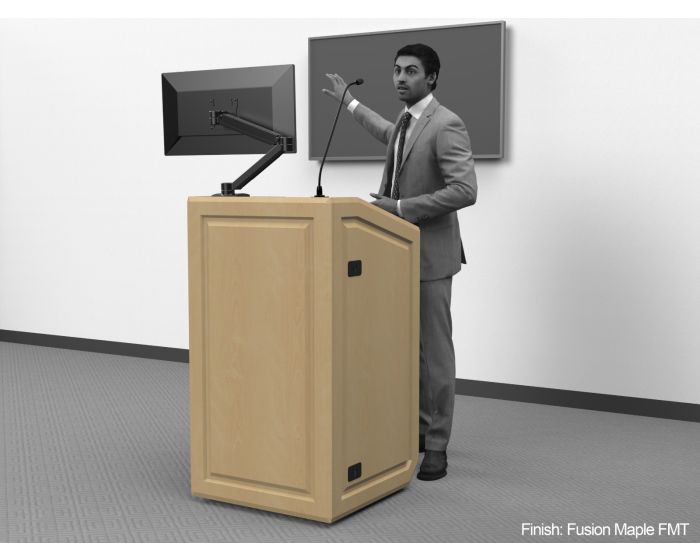
A multimedia podium is a podium or lectern built around internal rack space, routed cable management, and a worksurface sized for a PC, monitor, and AV controls, not just a place to set notes. Picking the right one comes down to how much equipment the room runs and who presents from it.
Boardrooms, lecture halls, and government briefing rooms are all pushing more equipment through the front of the room than they were five years ago, and pro AV as an industry is growing to match. If you’re still sorting out the terminology, our guide on podium vs. lectern differences is a useful starting point before getting into multimedia-specific features. AVIXA’s own research puts the pro AV market at $332 billion in 2025, on pace for $402 billion by 2030, with corporate still the largest buyer segment even as government, military, and utilities spending accelerates faster (source: AVIXA, August 2025). A flat-top lectern with nowhere to put a switcher, a PC tower, or a camera controller doesn’t keep up with that kind of load, no matter how nice the finish looks.
Explore AVFI Multimedia Podiums and Lecterns
In short: A multimedia podium differs from a standard one in three ways: rack space (usually 10U to 14U) for AV equipment, a worksurface wide enough to run a laptop, monitor, and control panel side by side, and cable management built into the chassis instead of routed through extension cords across the floor. Mobility, locking storage, and height adjustment are common add-ons layered on top depending on the room. Most buyers land on a model based on how much gear has to live inside the unit, not on styling alone.
What Exactly Makes a Podium “Multimedia”?
A multimedia podium is a presenter station built with internal rack rails, dedicated cable pathways, and a worksurface designed to run a laptop, monitor, microphone, and control system simultaneously, rather than a surface meant only to hold notes. The rack space is what actually separates it from a standard podium: without it, every device added to the room turns into a loose cable and a box sitting on the floor next to the unit.
Why Does Rack Capacity Matter More Than It Sounds Like It Should?
Rack capacity decides how much of a room’s AV infrastructure the podium can absorb versus how much has to live somewhere else, in a separate credenza, a floor box, or a closet down the hall. A 10U rack holds a basic switcher and an amplifier. A 14U rack has room for a switcher, a DSP, an amplifier, and a spare slot for whatever gets added next year, and rooms rarely get simpler over time.
AVFI’s Multimedia Podium with Rack (PD3002) is built around that logic: a 41" W x 28.75" D (104 cm x 73 cm) worksurface, a slide-out keyboard shelf, and 10U of front-and-rear rack rails, plus a locking PC compartment and a 24" W x 20.5" D x 7.625" H (61 cm x 52 cm x 19 cm) pullout drawer for anything that doesn’t rack-mount cleanly. The Dual Rack Multimedia Podium (PD3007) uses the same 43" x 30" (109 cm x 76 cm) footprint but trades the PC bay for extra rack depth, worth it if the room’s PC lives elsewhere and rack space is what’s actually tight.
For rooms running heavier AV loads, document cameras, projectors, or a dedicated control processor, the Low Top Multimedia Podium (PD4502), at 49" W x 31.75" D x 39.22" H (124 cm x 81 cm x 100 cm), steps up to 14U of rack space behind a locking acrylic door and adds a side shelf built specifically for a document camera or projector.
Does Classroom Use Change What You Need?
Somewhat, yes. Classroom multimedia podiums see more daily handling than a boardroom lectern ever will: different instructors, rolling carts moving in and out, students occasionally leaning on the corner between classes. The furniture needs to hold up to that without the rack rails loosening or the casters seizing.
The Teaching Multimedia Station (EDU-PD) is built for exactly this: a 47" W x 24" D (119 cm x 61 cm) thermowrap surface, an articulating keyboard and mouse tray, and a 14U compartment with front and rear EIA-compliant rack rails behind a locking door. It’s mobile by design, meant to move between rooms rather than anchor one permanently, which matters if a building shares AV equipment across several classrooms instead of dedicating a full setup to each one. For more on when mobility should win over a fixed installation, see our comparison of mobile vs. fixed podiums.
For a smaller footprint that still carries a full 14U rack, the Multimedia Lectern (LEX31), at 24-7/8" W x 25-1/4" D x 45-1/4" H (63 cm x 64 cm x 115 cm), offers a flat or wedge top option and a hidden-lock rear door, a cleaner look from the audience side than a unit with visible latches.
What About Height-Adjustable Multimedia Podiums?
Worth considering whenever more than one person presents from the same station, which is the norm in shared classrooms, training rooms, and multi-department facilities. The Height Adjustable Multimedia Lectern (LEXYZ34) uses a silent lift mechanism to move its 27.31" W x 28.85" D (69 cm x 73 cm) worksurface between 32.5" and 48.5" (83 cm and 123 cm), with an interior shelf that can be swapped for a 12U drop-in rack cube.
That range isn’t arbitrary. The U.S. Access Board’s ADA Standards for Accessible Design set work-surface height between 28" and 34" (71 cm and 86 cm) for accessible use, and a height-adjustable unit meets that as a built-in design feature instead of something bolted on after the fact for one presenter and left wrong for the next. Fixed-height multimedia podiums can still meet ADA requirements at a single specified height, but a shared, multi-presenter room usually gets more real-world use out of adjustability than out of picking one “average” height and hoping it works for everyone.
Do You Actually Need All That Rack Space, or Is It Overkill?
Here’s an honest correction worth making: not every room that wants a “multimedia podium” needs the full 14U treatment. A single-purpose room with a wall-mounted display and a wireless presentation system might genuinely be fine with a smaller worksurface and a shallow rack, and buying the largest available unit “to be safe” just leaves empty rack space and a bigger footprint than the room needs. The better question isn’t “how much rack space is available,” it’s “how much of our AV stack actually needs to live inside the podium versus in a separate credenza or wall enclosure.” Rooms that centralize everything at the podium need the deep rack. Rooms that split AV infrastructure between a credenza and the podium often don’t.
There’s also a real case for the technology earning its place in the room rather than being added because it’s available. Richard Mayer’s research on multimedia learning, one of the more cited frameworks in educational psychology, found that presentations combining well-organized visuals and narration outperform text-heavy slides read aloud, but only when the visual and audio channels are coordinated rather than competing for attention (source: Mayer, Cognitive Theory of Multimedia Learning monograph, Harvard T.H. Chan School of Public Health, 2023). A multimedia podium is the furniture that makes that coordination possible in the room: cable management and rack space aren’t cosmetic details, they’re what keeps a presenter’s setup from turning into a distraction of its own.
Which Multimedia Podium Fits Which Room?
| Room Type | Primary Need | Recommended Model |
|---|---|---|
| Small boardroom or briefing room | Compact rack, clean audience-side look | LEX31 |
| Mid-size training room or classroom | 10U rack, keyboard shelf, mobility | PD3002 or PD3007 |
| Lecture hall or high-tech classroom | 14U rack, articulating keyboard tray | EDU-PD |
| AV-heavy room with document camera / projector | 14U rack, dedicated accessory shelf | PD4502 |
| Shared, multi-presenter, or ADA-priority space | Height adjustment, drop-in rack option | LEXYZ34 |
Most rooms outfitted with a multimedia podium also need matching seating and a place for a second display. AVFI’s tables and desks collection rounds out the room, and for setups that need a movable secondary display instead of another full station, the Multimedia AV Cart (103324) covers that gap. Either pairs with the options and accessories collection for the monitor mounts and cable management that finish off the setup.
Why Does Hybrid Meeting Demand Keep Pushing This Trend?
Because the rooms these podiums sit in are running more video, not less. Pew Research Center found that as of October 2024, 43% of workers with remote jobs are on a hybrid schedule, and 54% of that group uses video conferencing platforms often, not occasionally (source: Pew Research Center, February 2025). Every one of those meetings routes through a camera, a mic, and a display, usually from the front of the room, which is exactly the equipment a multimedia podium is built to hold and route cleanly instead of leaving to a tangle of cables across the floor.
Building a Room That Won’t Need a Redo in Two Years
The furniture decision that causes the most regret isn’t picking the wrong finish, it’s under-estimating the rack space for where the room’s AV needs are headed, not just where they are today. AVFI builds multimedia podiums and lecterns for education, corporate, and government spaces across the United States, with the rack capacity, cable management, and height-adjustable options that a room’s actual equipment load requires, not a generic spec sheet. For a related look at outfitting a full room rather than a single station, see how to outfit a corporate training room.
Government agencies specifying similar AV-integrated podiums should also see our guide to furniture for government spaces for the security and ADA considerations that add to the mix.
Explore AVFI Multimedia Podiums and Lecterns:
- Multimedia Podium with Rack (PD3002)
- Dual Rack Multimedia Podium (PD3007)
- Low Top Multimedia Podium (PD4502)
- Teaching Multimedia Station (EDU-PD)
- Multimedia Lectern (LEX31)
- Height Adjustable Multimedia Lectern (LEXYZ34)
Browse the full AVFI podium and lectern collection
Not sure which rack capacity your room actually needs? Contact the AVFI team for a walkthrough based on your equipment list, not a brochure spec.
Multimedia Podium Questions We Hear Most
What’s the difference between a multimedia podium and a regular podium?
A regular podium is mostly a worksurface and storage; a multimedia podium adds rack rails, cable pathways, and a worksurface sized for a PC, monitor, and controls running at once. The rack space is the real dividing line.
How much rack space do I actually need?
It depends on what has to live inside the unit versus in a separate credenza. A basic switcher and amplifier fit in 10U. Add a DSP, a camera controller, or room for future upgrades, and 14U gives more breathing room without forcing a swap later.
Can a multimedia podium be mobile and still hold a full rack?
Yes. Most of AVFI’s multimedia podiums, including the EDU-PD and the PD3002 series, ship on heavy-duty casters with a full rack intact. Locking casters matter more here than on a standard podium, since a fully-loaded rack unit is heavier to reposition safely.
Do multimedia podiums need a dedicated PC, or can they run off a laptop?
Either works. Some models, like the PD3002, include a locking PC compartment for a dedicated tower, while others are built around a laptop and a keyboard tray instead. Worth deciding this before ordering, since it affects which interior configuration fits.
Is a height-adjustable multimedia podium worth the extra cost for a single-presenter room?
Usually not, if genuinely only one person ever presents from it. Height adjustment earns its cost in shared or multi-presenter rooms, or wherever ADA compliance across a range of users is a requirement rather than a nice-to-have.
How does a multimedia podium handle document cameras or projectors?
Models like the PD4502 build a dedicated side shelf for exactly that, keeping the accessory at a usable height without eating into the main worksurface. Not every multimedia podium includes this, so it’s worth checking before assuming the space is there.
Sources: AVIXA, “AVIXA Research Forecasts Pro AV Industry Set to Reach $402 Billion by 2030” (August 2025); Pew Research Center, “How COVID-19 Changed U.S. Workplaces” (February 2025); U.S. Access Board, ADA Standards for Accessible Design, Chapter 9 (§902.3); Richard E. Mayer, Cognitive Theory of Multimedia Learning monograph, Harvard T.H. Chan School of Public Health (2023).